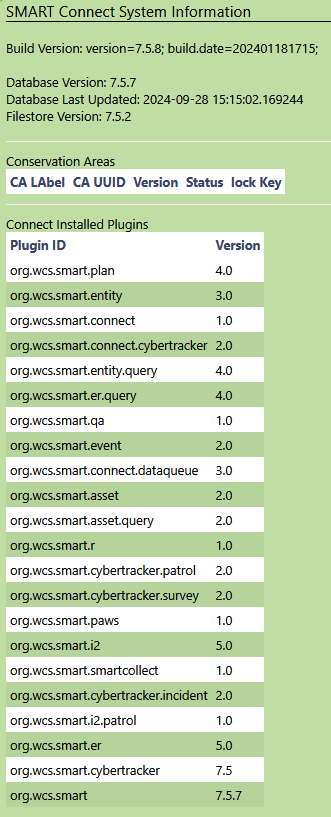
I have a Connect Server running on Windows Server. Everything is running fine with Desktop Sync and all. But recently, users started having issue logging onto the Connect Server to grab the latest SMART Mobile package.
They are getting “Bad username / password” error upon pressing the login button.
The logs on server side is showing “Unauthorized access” for that particular user account. The peculiar thing is, SMART Mobile users on iPhones are able to access using the same credentials. On Android phones, they get the “Bad username / password” error.
I suspect that there might be some bug in the way Android phones are processing server requests on the latest build. Can anyone help with this?
Both are using build 1.0.576. I’ve also attached the version info for the Connect Server here for reference.
Sorry no one got back to you. This is being looked at.
Not from my brain but here’s some thoughts in the meantime:
"This pattern (iOS can log in, Android gets “Bad username/password”) is usually one of these:
Device time skew (Android clock behind/ahead): tokens are time-based. On Android go to Settings → Date & time and turn on Use network time and Use network time zone, then retry.
TLS/certificate chain not fully trusted on Android: iOS accepts the chain, Android rejects it → the app surfaces a generic auth error. On the Android device, open your Connect URL in Chrome.
If you see a cert warning or no padlock, install a certificate with the full chain (incl. intermediates) on the server, then retry login in the app.
Password characters: a few symbols (e.g., +, %, &) can trip Android’s request encoding on some builds. To test quickly, set a temporary alphanumeric password for one affected user in Connect → User Accounts, then try again on Android."