Hi SMART Community
We are having a persistent error when we try and sync our CA from an Apple Mac laptop. When two windows laptops sync (V 7.5.7 vs V 7.5.10 - both versions for windows compatibility) via connect, all works as it should. When the Mac user (V 7.5.9 - for Mac operating system) syncs with connect (successfully), the next time we try sync from either windows laptop, we receive the below error. We tried redownloading SMART from scratch on the Mac, with the appropriate plugins, to see if it was a local copy glitch, but the same thing happened again. This error occurs on the windows’ CAs even after no changes are made by the Mac user since their initial “replace CA with CA from connect” followed by a sync and logout. Please let us know if there is anything we can try, we need the CA on the Mac Laptop as well.
Thank you very much!
Mich
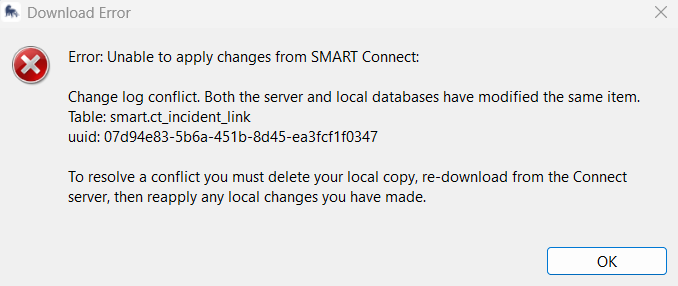
Error Message (in case image does not upload): Error: Unable to apply changes from SMARt connect: Change log conflict. Both the server and local databases have modified the same item. Table: smart.ct_incident_link. Uuid: 07d94e83-5b6a-451b-8d45-ea3fcf1f0347
To resolve a conflict you must delete your local copy, re-download from the Connect server, then re-apply any local changes you have made.
Hi Michelle,
This error means SMART has detected that the same record (in this case from the ct_incident_link table) was modified both locally and on the Connect server since the last sync — so it doesn’t know which version to keep.
What’s likely happening here is that your Mac installation (7.5.9) is writing slightly different metadata than the Windows installations (7.5.7 / 7.5.10). The Mac build uses a different database engine wrapper, and it sometimes records minor field updates even if no visible edits were made. When the Mac syncs, those metadata changes flag the same record as “updated,” which then conflicts with Windows’ local copy on the next sync.
Unfortunately, there isn’t a way to merge this automatically — SMART Connect can only choose one source of truth per record.
If possible, it’s also best to align the software versions. Aligning all to 7.5.10 may eliminate this problem. For now, you can try to use one primary system for edits and re-download on others after that system syncs.
Cheers,
Alex
Hi Alex
Okay thank you very much for this info, it is good to know to try and keep operating systems consistent across a site. Right now, the issue seems to have resolved itself but I did pass on to try and keep versions the same on both devices. I am not going to encourage an update while everything is working fine though, only if we encounter the same error down the line.
Thanks a lot
Mich