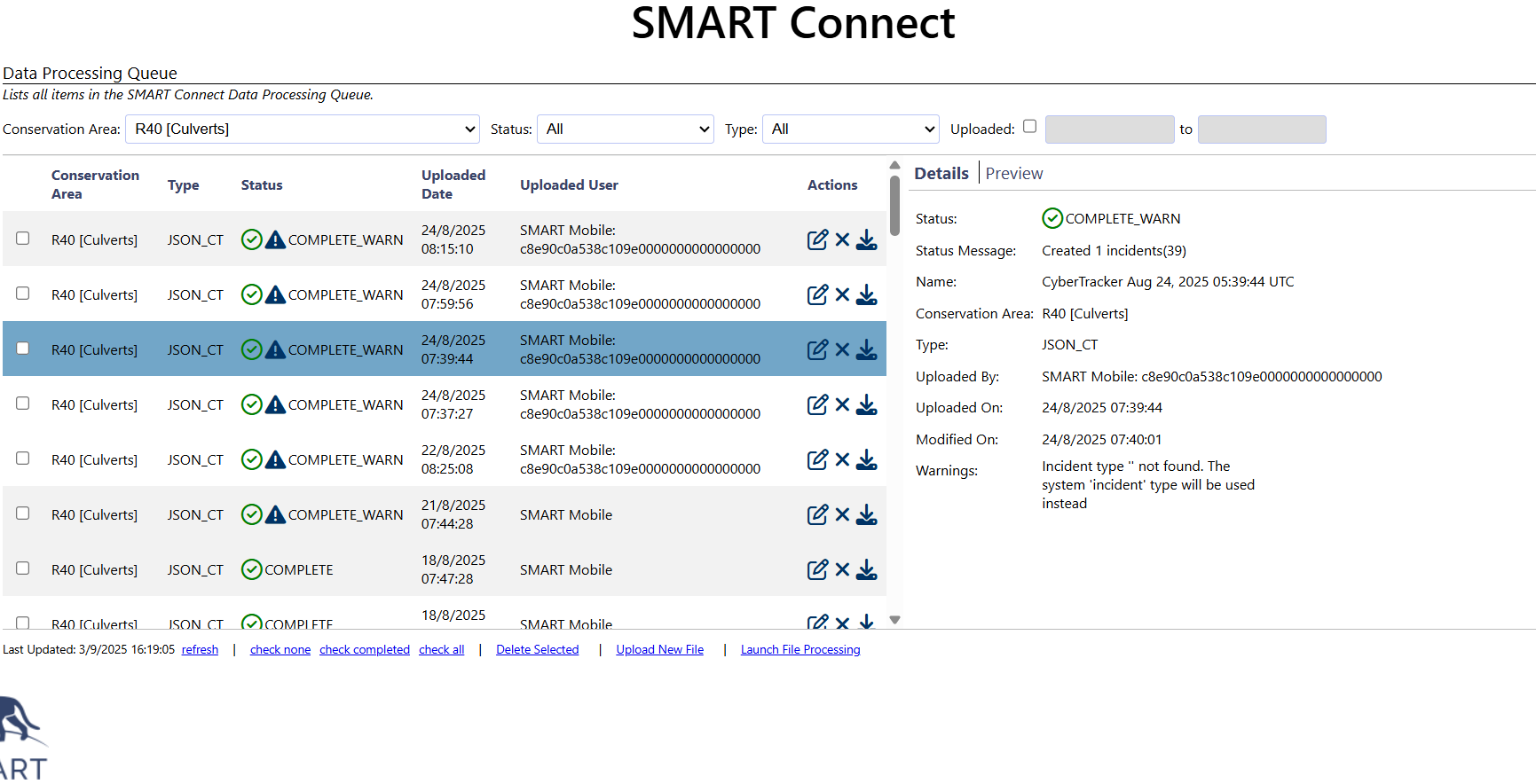
Hi, Is someone else gettings this error when processing data in the queue?

Kind regards,
Elke
Hi, yes I am getting it too recently…!
@matt.hron or @justinsteventon,
Please can you let us know how to fix this error? Personally, I am unable to access any of this important data.
Thank you.
Kind regards,
Marine
@jsimfukwe copying you in, since more people are getting this same error.
@jsimfukwe @justinsteventon @matt.hron
Hello, hoping you can help us on this error please as it’s still happening.
Thank you.
Kind regards,
Marine
Hello Elke and Marine,
Sorry I didn’t see this due to an issue with not getting notifications from the Forum. Are you still seeing this issue? If so, it would be helpful if you could share the error log and an example file for further investigation.
Hi Matt,
I don’t see the issue anymore since upgrading to SMART 8, however I cannot open my data anymore.
I have over 60 data in the processing queue on SMART Connect that show “COMPLETE_WARN” message (see attached screenshot) and I am unable to access this data on SMART desktop. They don’t even appear in the data queue. Please advise how we can retrieve the data? We urgently need them.
Although I also need the images associated with the data, in the meantime I was trying to retrieve the information by using the JSON Viewer advised in another conservation. However, only information that needed to be typed manually (with text) appears. The information that were selected from a list do not appear. See below how it looks:
| a:0:423721fda07746859b76fed09b132054 | : | l:3f21c1ac225844518a1ada439ca84ef3 |
|---|---|---|
| a:0:4596aab115f4431880f8a36054fa52ab | : | l:74346c3844fe4a24b3b4e3142346087f |
| a:0:4f485805ee2948729c6dc0c4a3e3706b | : | l:ba98f77615794440ac77d53306f98b53 |
| a:0:a85e78529cd04972a4ff9aed2def8183 | : | l:ec2f96d2612c4435963831dc56b38187 |
| a:0:d68155956d054c9a9594a1cdefeb76b3 | : | l:08d80aff880347fb87cc12e0af6ae223 |
| a:0:e1980e36822347e6b87cd80bea8f7b06 | : | Vervet |
| a:0:e6e2b73ec58d41a699c420cda9bc55a2 | : | Raven |
| a:0:ec3a2d44370542b59c9075252287c589 | : | R40-5\n80.0N |
Vervet, Raven for example were written down but the rest of the information were selected from a list. How can I read this?
Besides, isn’t it possible to import the file from SMART Connect into SMART desktop?
Thank you
Hi @matt.hron and @justinsteventon, please may you assist regarding the above? Thank you
@Oliver are you available to help with this?
Hi Marine,
That most recent screenshot with the “Complete_Warn” Status means that the data was successfully loaded into your CA, but with a warning, which is shown there. It is about a missing “incident type”, which is a concept that was added SMART Desktop and SMART Mobile recently to be provided as a part of independent incidents. The warning is not detrimental, your incidents will simply be loaded into the default type.
Since the data was loaded into SMART, once sync’d with Connect it should be viewable on
the Desktop as well. The row highlighted in the image indicates that the
incident created has the ID #39 (see the “Status Message” line), so you could look for that incident ID on the desktop to find that particular data.
Once the data files have been processed directly on Connect (which is the new default in SMART 8 as it is much simpler than the previous desktop-based processing) you cannot also process them on the Desktop. I would recommend processing all data on Connect now, and no longer process any data on desktop.
To stop that warning from recurring, my guess is you need to update the SMART Mobile packages on SMART Desktop, and reexport them to the devices, also ensuring you have a recent version of SMART Mobile. If both the exported package and SMART Mobile are version 8+, then you should no longer see these warnings.