We are currently using Ulefone Power Armor 14 Pro devices (Android 12) and have noticed an issue after deploying several of them in the field. Photos taken through SMART Mobile appear blurry, and we haven’t been able to determine how to resolve it.
Interestingly, the phone’s native camera takes clear photos, so it seems there may be some kind of compatibility issue between the device camera and SMART Mobile.
Has anyone experienced something similar or found a solution?
Additionally, we are looking to purchase some new rugged phones for field deployments. As models seem to change quite quickly, we would appreciate any recommendations for rugged devices with reliable GPS and good cameras that are currently available on the market.
We had the same problem a long time ago, and a friend told me the following.
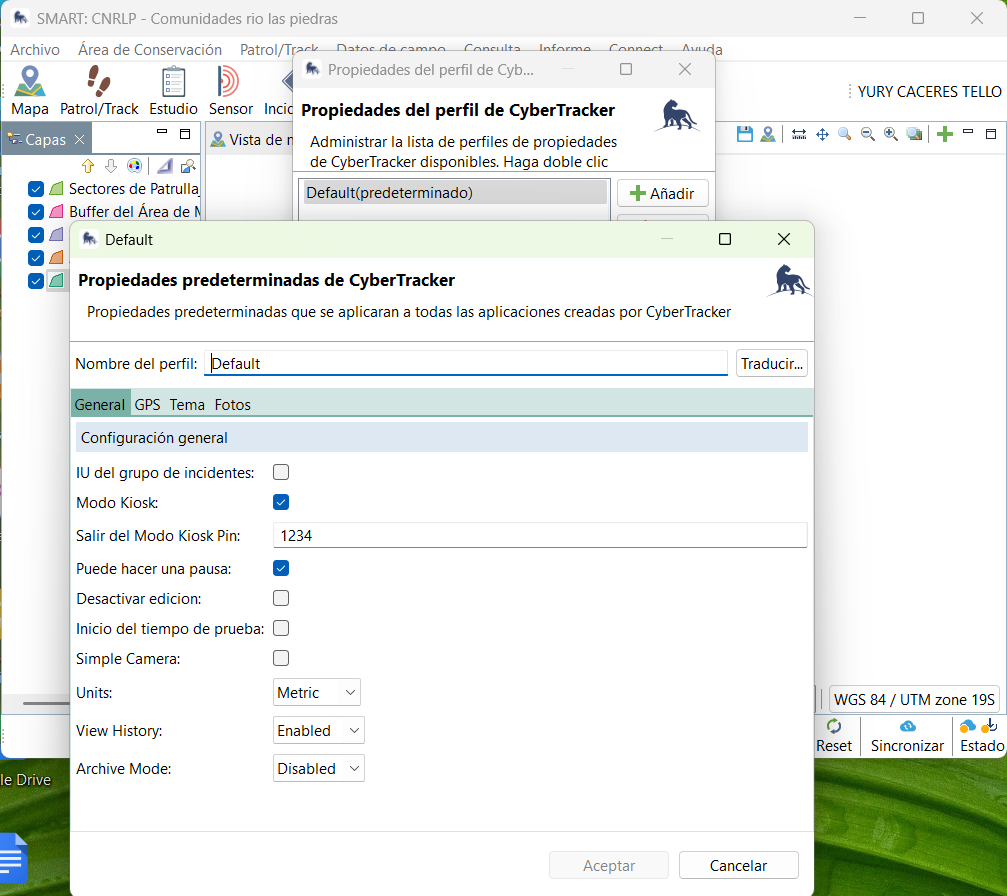
In Smart Desktop there is an option to activate or deactivate the “simple camera”; perhaps it is active.
I do not think simple camera will work. In SMART 8, this just means you cannot select a file.
If the SMART Mobile camera is not working, this is something we would like to fix, but have not been able to get hold of one of these devices yet.
As a workaround, leave simple camera unchecked and use the system camera app to capture the picture, then select it as a file from the SMART Mobile camera dialog.
This happens on all the mobile devices, Android and Iphone, that we have used. The camera quality via SMART is very poor so the only way to get good pictures is indeed to select a file from the gallery but that adds more steps in entering data unfortunately.
Could you check the settings around photo quality in SMART Mobile? Open project, Settings, Configuration. Check out the “Resize photos” property. This comes from desktop and reduces the image size to try and save space. If you are seeing this across all devices, then that could be the cause.