Hey there,
I’m facing this issue about reports and null values in sample properties:
So, I would like to know: Is there a way to make a sample property mandatory?
Thanks
Jackie
Hey there,
I’m facing this issue about reports and null values in sample properties:
So, I would like to know: Is there a way to make a sample property mandatory?
Thanks
Jackie
Hi Jackie,
SMART does not currently support enforcing “mandatory” sample properties in the same way it does for data model attributes (e.g., observation attributes).
That’s why when you try to make it mandatory or leave it blank, the system will not block you—it will just leave it as null and cause null values in reports and conditions (as you saw in your “conditional” evaluation table).
I’m not an expert with Survey but here’s a few possible workarounds that may work**:
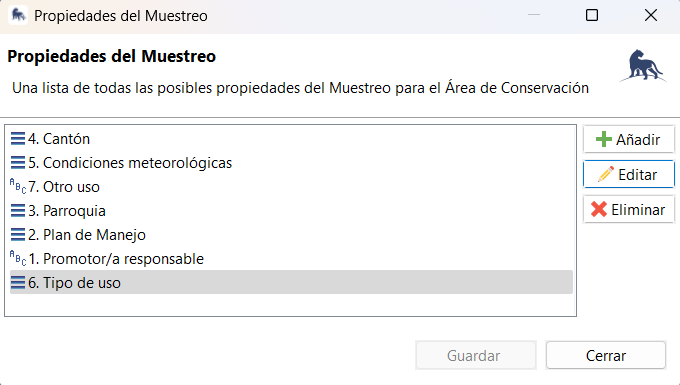
You can define a default value for “Tipo de uso” during the sampling unit import or design process.
That way, every new sample automatically has a value — avoiding nulls later.
Since mandatory flags don’t apply, the alternative is to:
Tipo de usoIf you must enforce completion, consider converting it from a sample property to a mission attribute or observation attribute in the data model.
Please let us know if any of these are applicable.
Cheers,
Alex
Hey Alex,
Thanks for sharing ideas!
How can i set default values in the survey design?
Jackie
Hi Jackie,
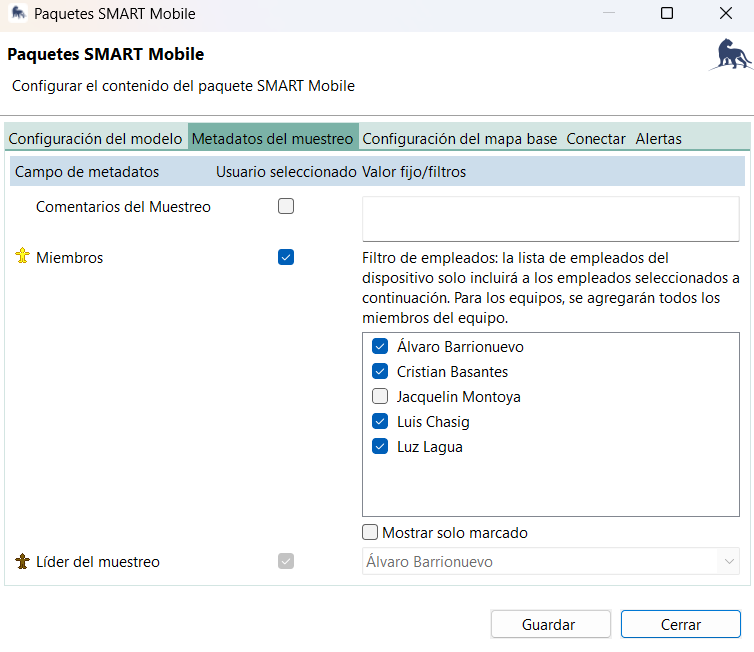
When you are exporting your package to your mobile device, edit the package, find mission meta data and you should be able to set the default field there. If the attribute is within your data model, then you would need to do the edit at the configureable data model, find the attribute you would like to set as default and make the edit there. I hope this helps.
Hey @Jmaazbze
Thanks for your answer. I was trying to configure it in the package, but the sample properties do not appear in this option
Jackie